QMT实时Tick监控示例代码
本页面展示如何在QMT内置Python环境中获取实时Tick数据,监控指定股票的五档盘口变化,并根据最新价与买卖盘的关系判断成交方向。
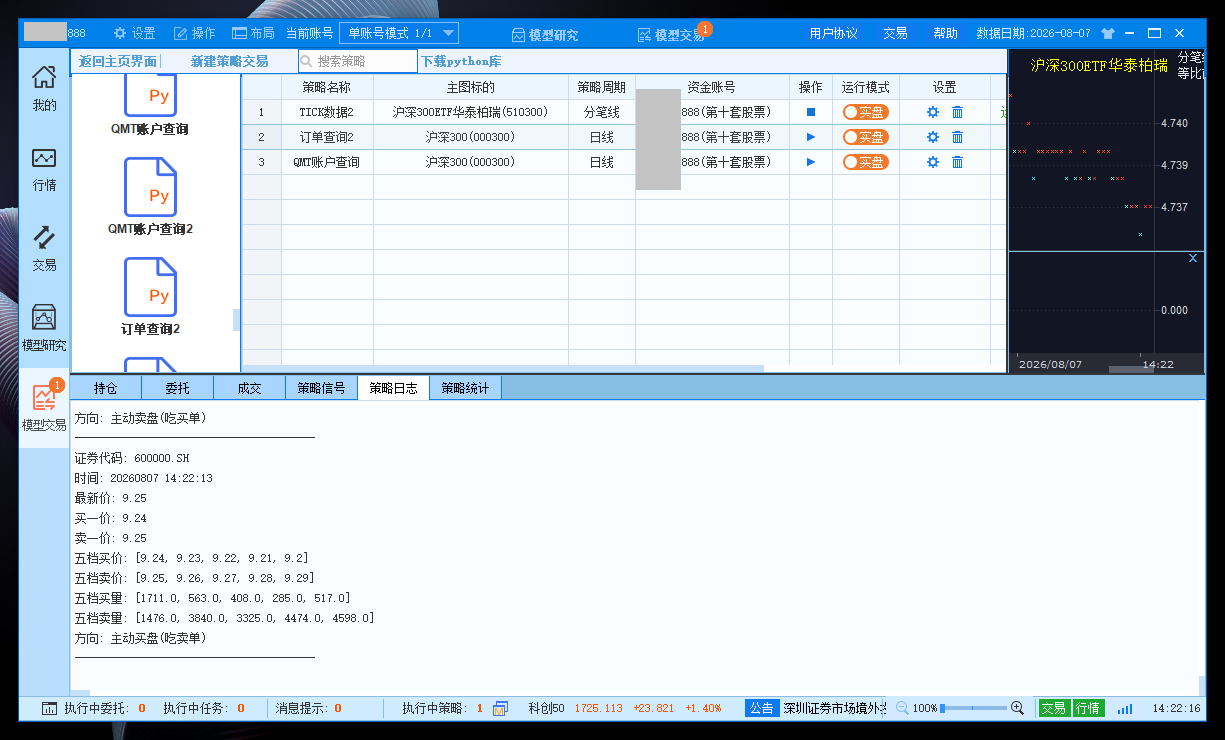
功能说明
该示例代码运行于QMT内置Python环境中,实现以下功能:
- 通过
ContextInfo.set_universe设置监控股票列表 - 通过
ContextInfo.get_full_tick一次性获取所有监控股票的Tick数据 - 提取最新价、五档买价/卖价、五档买量/卖量等字段
- 根据最新价与买一/卖一价的关系判断成交方向(主动买盘、主动卖盘或中性成交)
- 格式化输出完整的盘口信息
使用方法
- 登录QMT软件,进入「模型研究」
- 新建Python策略文件
- 点击下方「复制代码」按钮复制完整代码
- 将代码粘贴到QMT策略编辑器中
- 修改
watch_list为您需要监控的股票代码列表 - 点击「编译」保存策略
- 在「模型交易」中运行策略,查看日志中输出的Tick数据
示例代码
tick_monitor.py
#coding:gbk
"""
QMT实时Tick监控 - 只监控指定列表,不依赖主图
"""

import datetime

# 要监控的股票列表(只监控这两只)
watch_list = ['510300.SH', '600000.SH']

def get_current_time_str():
    return datetime.datetime.now().strftime('%Y%m%d %H:%M:%S')

def format_value(value):
    if isinstance(value, (int, float)):
        return round(float(value), 3)
    elif isinstance(value, list):
        return [round(float(x), 3) if isinstance(x, (int, float)) else x for x in value]
    return value

def determine_direction(last_price, bid1, ask1):
    if bid1 is None or ask1 is None or last_price is None:
        return 0
    if last_price >= ask1:
        return 1
    elif last_price <= bid1:
        return -1
    else:
        return 0

def init(ContextInfo):
    # 只监控用户指定的股票列表
    ContextInfo.set_universe(watch_list)
    print(f"[INFO] 策略初始化完成,监控股票: {watch_list}")
    print("[INFO] 等待tick数据...")

def handlebar(ContextInfo):
    # 获取所有监控股票的tick数据(一次性获取,更高效)
    all_ticks = ContextInfo.get_full_tick(watch_list)
    if all_ticks is None:
        return

    # 遍历监控列表中的每只股票
    for stock_code in watch_list:
        tick_data = all_ticks.get(stock_code)
        if tick_data is None:
            continue

        # 提取字段
        last_price = tick_data.get('lastPrice')
        bid_prices = tick_data.get('bidPrice', [])
        ask_prices = tick_data.get('askPrice', [])
        bid_vols = tick_data.get('bidVol', [])
        ask_vols = tick_data.get('askVol', [])

        if last_price is None or last_price == 0:
            continue

        bid1 = bid_prices[0] if bid_prices else None
        ask1 = ask_prices[0] if ask_prices else None

        direction = determine_direction(last_price, bid1, ask1)
        direction_desc = {
            1: "主动买盘(吃卖单)",
            -1: "主动卖盘(吃买单)",
            0: "中性成交(盘口内部)"
        }.get(direction, "未知方向")

        output = {
            '证券代码': stock_code,
            '时间': get_current_time_str(),
            '最新价': format_value(last_price),
            '买一价': format_value(bid1),
            '卖一价': format_value(ask1),
            '五档买价': format_value(bid_prices),
            '五档卖价': format_value(ask_prices),
            '五档买量': format_value(bid_vols),
            '五档卖量': format_value(ask_vols),
            '方向': direction_desc
        }

        for k, v in output.items():
            print(f"{k}: {v}")
        print("-" * 40)

def stop(ContextInfo):
    print("[INFO] 策略停止")
代码说明
该示例代码主要包含以下功能模块:
- 股票列表配置:通过
watch_list设置需要监控的股票代码 - 数据格式化:
format_value函数将数值保留3位小数,列表元素逐个格式化 - 方向判断:
determine_direction函数根据最新价与买一/卖一价的关系判断成交方向 - Tick获取:通过
get_full_tick一次性获取所有监控股票的Tick数据,效率更高 - 盘口解析:提取最新价、五档买价/卖价、五档买量/卖量等字段
- 结果输出:按股票逐个打印完整的盘口信息和成交方向
成交方向判断规则
| 条件 | 方向 | 含义 |
|---|---|---|
| 最新价 ≥ 卖一价 | 主动买盘 | 买方吃卖单,股价上涨 |
| 最新价 ≤ 买一价 | 主动卖盘 | 卖方吃买单,股价下跌 |
| 买一价 < 最新价 < 卖一价 | 中性成交 | 盘口内部撮合成交 |
注意事项
- 该代码运行于QMT内置Python环境,需在QMT策略编辑器中运行
watch_list中的股票代码格式需正确(如510300.SH)- 非交易时段或停牌股票的最新价为0或None,代码会自动跳过
- Tick数据仅在交易时段更新,非交易时段无数据输出
- 策略仅监控行情,不会触发任何交易